

BunsenLabs Carbon released with latest Debian 13 base and Wayland support.
If you appreciate a minimal yet functional desktop environment, BunsenLabs has released its latest version, Carbon, based on Debian 13 “Trixie”. This release builds on the legacy of CrunchBang Linux, offering a pre-configured Openbox setup that’s easy to customize.
Powered by the Linux 6.12 LTS kernel, it focuses on efficiency for older hardware while introducing modern features like Wayland support. Released on February 11, 2026, Carbon is available for download from the official site.
For those new to BunsenLabs, it’s a distribution that boasts a lightweight Openbox window manager, combined with tools like Conky for system monitoring and jgmenu for a responsive desktop menu. Carbon continues this tradition but updates several components to improve compatibility and user experience.
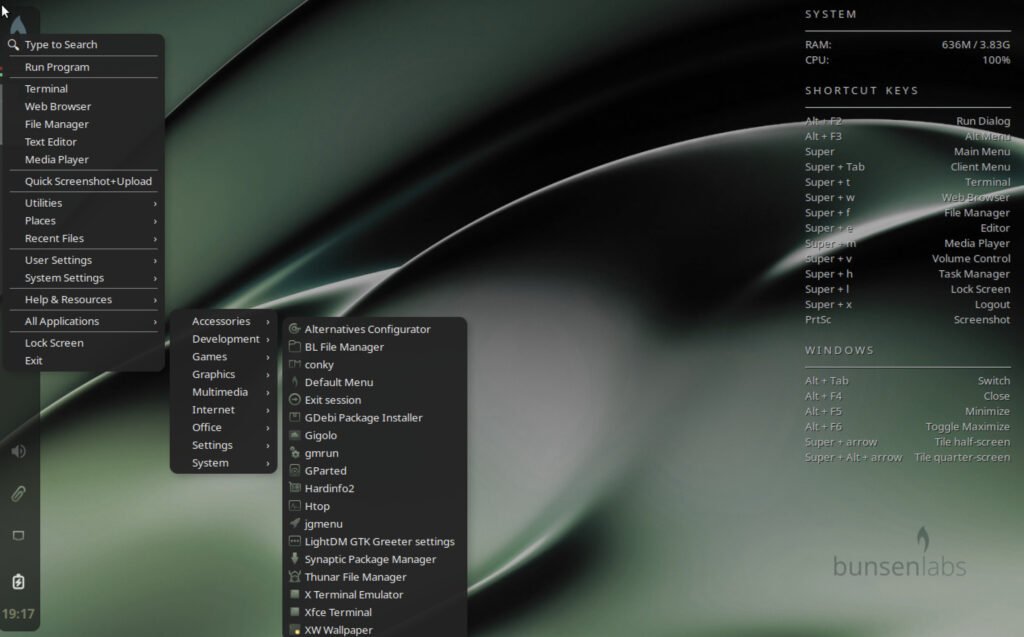
Table of Contents
BunsenLabs Carbon: What’s New
Carbon introduces several updates to core applications and system behavior, making it more versatile for both X11 and Wayland sessions. Here are the major highlights:
Wayland Session Support
The BunsenLabs session can now launch Wayland sessions if the required applications and configurations are in place. A metapackage for a basic Wayland setup will be available soon. This is a step forward for users interested in moving away from X11, with environment variables like BUNSEN_SESSION_TYPE set to “x11” or “wayland” for detection.
Application Replacements for Better Compatibility
To support Wayland and simplify theming, several tools have been swapped out. For example, nitrogen is replaced by xwwall and feh for wallpaper management, tint2 by xfce4-panel for the taskbar, lxappearance by nwg-look for theme settings, lxterminal by xfce4-terminal, arandr by lxrandr for display configuration, and policykit-1-gnome by mate-polkit for authentication.
Dropped Packages and Requirements
The xserver-xorg-video-intel driver and qt5-style-plugins are no longer included by default. The Picom compositor now requires 3D acceleration and OpenGL, so ensure your hardware supports this or disable compositing if needed.
New Commands and Wrappers
A new “bl-menu” command allows starting the menu from the same launcher on either X11 or Wayland. Wrapper scripts handle pkexec under Wayland and use sudoedit for root file editing. The bl-exit tool now uses xfce4-screensaver for screen locking, which works across sessions.
Configuration Updates
Openbox and labwc config files have moved to ~/.config/bunsen/openbox and ~/.config/bunsen/labwc for better organization. Panel icons in xfce4-panel are scaled via GTK CSS in ~/.config/gtk-3.0/gtk.css, with defaults like scale(0.6) for pulseaudio-button. GTK4 applications default to a dark theme using gsettings.
Bluetooth and Audio Improvements
The bunsen-meta-bluetooth package depends on libspa-0.2-bluetooth for PipeWire integration. This aligns with the shift to PipeWire/WirePlumber for audio handling.
Installation and Live Environment Changes
The live-build uses zstd compression for faster operations, and the GRUB menu displays “BunsenLabs” on first boot. The bl-welcome script is rewritten for efficiency and offers to convert apt sources to deb822 format. Note that 32-bit support is dropped, following Debian’s lead, so users on older 32-bit systems should stick with BunsenLabs Boron until June 2028.
Theme and Preset Enhancements
New presets like Carbon-Sage and Carbon-Bark are added to the blob tool, which now supports saving and restoring xfce4-panel settings via xfconf. Older presets that used tint2 will prompt for installation if needed.
Download
If you’re running a previous BunsenLabs version on 64-bit hardware, you can upgrade via apt. For new installs, download the ISO from the BunsenLabs website or SourceForge. Test it in a virtual machine first, and remember to enable 3D acceleration in settings like virt-manager if the desktop appears glitchy.
Direct ISO link: https://ddl.bunsenlabs.org/ddl/carbon-1-260211-amd64.hybrid.iso
Direct torrent link: https://ddl.bunsenlabs.org/ddl/carbon-1-260211-amd64.hybrid.iso.torrent
Official download page: https://www.bunsenlabs.org/installation.html
Wrapping up
The BunsenLabs keeps the lightweight computing alive with this is latest release. If you want a pre-built and fast Linux with solid Debian 13 base, this version surely may be the one for you.
Give it a try.
Via release notes.


