

Ubuntu 26.04 LTS codenamed “Resolute Raccoon” brings exciting improvements in desktop experience, security, and hardware support for the next five years.
Ubuntu 26.04 LTS codenamed “Resolute Raccoon” released on April 23, 2026. This is the latest long-term support release that brings solid improvements in security, desktop experience, and hardware support.
This release, will be receiving updates for 15 years (five years for the general public, plus an additional 10 years for Ubuntu Pro users).
Every Ubuntu LTS is special, considering that it will be supported for longer durations and millions of devices across users and clouds will be using the base image for real world applications.
This release builds nicely on the foundation from 24.04 Noble Numbat while adding exciting modern touches. If you love stability with fresh features, you will enjoy this version.
Let’s run down the key features of this release.
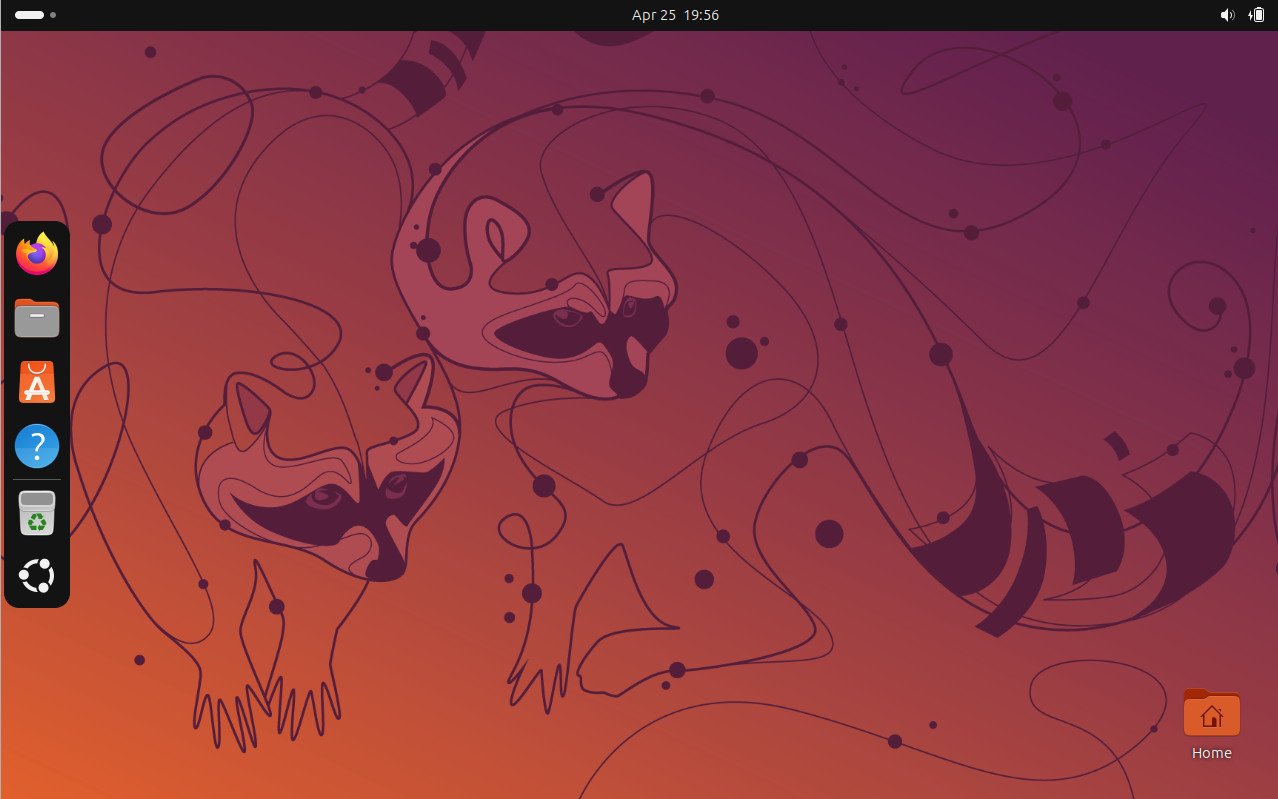
Table of Contents
Ubuntu 26.04 LTS: Key Features
This release focuses on resilience, security, and better everyday use. It ships with GNOME 50, Linux kernel 7.0, and many behind-the-scene changes that make the system feel more polished and secure. Here’s what stands out.
Linux Kernel 7.0
Ubuntu 26.04 LTS comes with Linux 7.0. This brings better hardware support, especially for newer Intel Core Ultra Series 3 (Panther Lake) processors with improved Xe3 graphics and NPU performance.
- Faster ext4 write performance in some cases
- Native IgH EtherCAT support for industrial and robotics use
- Enhanced power management and AI capabilities
GNOME 50 Desktop Experience
This is the first Ubuntu LTS to ship Wayland-only in the default GNOME session. No more Xorg desktop session, though XWayland remains for older apps. This means smoother visuals, better per-monitor scaling, native gestures, and no screen tearing.
At the core desktop experience is powered by GNOME 50 which removes X11 support and key features like:
- New session persistence system.
- Redesigned parental control interfaces.
- VRR enabled by default on supported displays
- New colourful folder icons
- Better contrast with bold text in notifications
- Power mode icon in top bar for Performance or Power Saving
- Expanded overview search with App Center and Google results
New default apps make daily life easier:
- Showtime replaces Totem as the video player
- Resources replaces GNOME System Monitor – cleaner and more modern
- App Center now handles Debian packages better with sorting and system updates
- Document Viewer gains ink tools and freeform text
I think, the shift to Wayland feels complete and stable now.
Snap Improvements
Snap application integration with the desktop has been improved, using the XDG Desktop Portal to manage application access to resources outside the sandbox. For example, a snap application can initiate the opening of files and directories from anywhere in the file system in the file manager and other desktop applications. Access to the camera, notifications, and USB devices can also be requested. Snap application access rights to external resources are controlled through the settings.
New telemetry panel, app center updates
There has been improvements on the package installation and updates. App Center is now treated as a single application for managing all types of applications, regardless of their format.
The permission prompt dialogs gets a new look which requires user to confirm access. For example, when accessing files in the home directory from snap pacjages. The dynamic access granting is now available using AppArmor mechanism.
The settings introduces a new “Telemetry” panel in the “Privacy & Security” section of the settings window. This gives you option to see what goes out from your system as a telemetry collection to Ubuntu servers. This is optional, can also be enabled during the initial setup wizard. This will also come up when you try to upgrade as well.
Full-disk encryption capabilities are improved, eliminating the need to enter a drive unlock password at boot by storing decryption keys in the TPM (Trusted Platform Module). Key recovery capabilities for TPM-based full-disk encryption have been implemented. Support for adding and removing PIN codes or passwords after installation has been added. An option for re-encrypting the drive has been added to the configuration tool.
Ubuntu Server, security and additional core changes
New Virtualization Stack (virt-hwe): A new Hardware Enablement virtualization stack has been introduced. It includes qemu-hwe, libvirt-hwe, seabios-hwe, and edk2-hwe packages. These components will receive updates twice a year alongside point releases —-similar to the kernel. A handy utility called ubuntu_virt_helper is included to easily switch between the standard and HWE virtualization packages.
Automatic OEM/HWE Drivers in Server Installer: The Ubuntu Server installer now automatically installs the necessary OEM and HWE metapackages with drivers and tools required for your specific hardware. authd for Cloud Identity: The new authd package makes it easier to set up centralized authentication using cloud providers such as Microsoft Entra ID and Google Cloud Identity.
Updated Core Package Versions:
- Linux kernel 7.0
- systemd 259.5
- glibc 2.43
- Chrony 4.8
- LibreOffice 26.2.2
- VLC 3.0.23
- GIMP 3.2.2
- GStreamer 1.28
- GTK 4.22.2
- Qt 6.10.2
- OpenSSL 3.5.6
- BlueZ 5.85
- CUPS 2.4.16
- Snapd 2.74.1
- Pipewire 1.6.2
- Mesa 26.0.3
Updated Developer Tools:
- LLVM 21
- GCC 15.2
- Python 3.13
- OpenJDK 25
- PHP 8.5.2
- Go 1.25
- .NET 10
- Rust 1.93.1
- strace 6.19
- PostgreSQL 18
- MariaDB 11.8.6
- MySQL 8.4.8
- Valkey 9.0.3
Updated Server Packages:
- Samba 4.23
- Exim 4.99.1
- Postfix 3.10.6
- unbound 1.24.2
- multipath-tools 0.12.2
- OpenLDAP 2.6.10
- containerd 2.2.1
- runc 1.4.0
- Docker 29
- libvirt 12.0.0
- QEMU 10.2.1
- EDK2 2025.11
- Netplan 1.1.2
- cloud-init 26.1
- OpenStack 2026.1
- HAProxy 3.2
- Apache httpd 2.4.65
- Nginx 1.28.2
- OpenSSH 10.2
sudo-rs Improvements: Ubuntu now uses sudo-rs by default (a Rust-based replacement for sudo). It shows password feedback with asterisks as you type. You can disable this by adding Defaults !pwfeedback in /etc/sudoers.
Rust Cargo-Auditable Support: Many Rust packages now support the cargo-auditable toolkit. This adds dependency metadata to executables, making it easier to track vulnerabilities. Supported tools include: alacritty, bat, du-dust, eza, fd-find, hyperfine, ripgrep, sd, and sudo-rs.
SYCL / DPC++ Support: A full compiler and libraries for Data Parallel C++ (DPC++) are now available, allowing you to build heterogeneous applications using the SYCL language.
Better Fingerprint Support: The libfprint library now supports more fingerprint sensors and includes Secure Device Connection Protocol (SDCP) support.
Hardware Video Encoding: VA-API hardware video encoding and decoding is enabled by default for both AMD and Intel GPUs.
Kernel & Systemd Changes:
- cgroupfs is now mounted with nsdelegate, memory_recursiveprot, memory_hugetlb_accounting options by default.
- Support for cgroup v1 has been completely removed from systemd.
- System V service scripts are now deprecated (compatibility layer still available).
Mount Point Change: External drives and media are now mounted under /run/media instead of the older /media directory.
NFS Services Removed: The blkmapd and nfs-blkmap services have been removed.
Discontinued Support: IBM Z z14 (LinuxONE II) and earlier systems are no longer supported.
Livepatch on ARM64: Kernel Livepatch (patching without reboot) is now available on ARM64 servers.
GPU Toolkits in Repositories: NVIDIA CUDA, NVIDIA DOCA-OFED, and AMD ROCm toolkits are now available directly from the standard Ubuntu repositories.
RISC-V RVA23 Full Support: Complete support for the RISC-V RVA23 profile (with vector and hypervisor extensions) has been added.
Confidential Computing: Full support for confidential VMs using AMD SEV-SNP and Intel TDX memory encryption (both host and guest).
Database Updates:
- Microsoft’s open-source DocumentDB 0.108 packages are now available.
- Full MariaDB support in the main repository.
- PostgreSQL i386 packages have been discontinued.
Kerberos Improvement: Kerberos now supports loading configuration files from the /etc/krb5.conf.d directory.
Official Ubuntu Flavors updates
Ubuntu is popular always due to its official flavours. Most of the key & active flavours brings their best and stable version in this release. However, a few could not due to limitations.
Here’s a quick summary:
Kubuntu: Ships with KDE Plasma 6.6, KDE Gear 25.12.3, Qt 6.10, and KDE Frameworks 6.24.0. Uses a Wayland-based KDE session by default. The X11 session package (plasma-session-x11) is still available in the repositories but is no longer maintained by the Kubuntu team.
Xubuntu: Continues with Xfce 4.20. The indicator plugin has been removed from the default panel. Most applications have been migrated to KStatusNotifier for better system tray icon support.
Lubuntu: Released with the latest LXQt 2.3 desktop environment.
Ubuntu Budgie: Comes with Budgie Desktop 10.10.2, now fully migrated to Wayland using the labwc compositor by default. VLC is the new default media player. Crystal Dock is the default panel with a redesigned top panel. A featured content section has been added to the application menu.
Ubuntu MATE & Ubuntu Unity: Ubuntu MATE 26.04 has not received LTS status. No official builds were created for Ubuntu MATE 26.04. At the end of March 2026, the Ubuntu MATE project leader announced his departure from the project. Ubuntu Unity 26.04 also continues to ship with Unity 7.7 shell.
Edubuntu: Features a completely rewritten installer and admin menu with two backends (GTK4 and Qt6) that you can choose based on your desktop. Includes the Cockpit web interface module. New default applications: Foliate e-book reader, Paperboy RSS reader, GNOME Showtime (replaces Totem), Arduino IDE, Raspberry Pi Imager, GChemPaint, and GNOME Notes (replaces Gnote). All GTK2-based packages (such as chemtool) have been removed.
Ubuntu Cinnamon: Ships with Cinnamon 6.4.13. Replaced gnome-font-viewer with font-manager, which offers better support for Cinnamon themes.
Ubuntu Studio: Offers three switchable desktop layouts:
- Classic (top panel)
- macOS-style (global menu)
- Windows 10-style (bottom panel)
The installer and sound configuration tool have been fully rewritten in Python with GTK4 and Qt6 backends. The new sound configurator supports FFADO for FireWire devices and allows detailed PipeWire settings (sample rate, buffer size). New additions:
- Loopino audio plugin (LV2/CLAP/VST2) for loading, trimming, and looping audio.
- PipeWire settings applet in the system tray.
- snd-hdspe driver support for RME HDSPe sound cards.
- DistroAV package for NDI audio/video transmission to OBS Studio.
Updated creative apps: OBS Studio 32.1.0, FreeShow 1.5.9, QPrompt 2.0.1, RaySession 0.17.4, Patchance 1.3.2, Geonkick 3.7.0, BChoppr 1.12.8, harpwise 6.34.4, and Blender 5.0.1
System requirements
The minimum system requirements for Ubuntu Desktop 26.04 have been increased from 4 to 6 GB of RAM (the previous change was in 2018, when the RAM requirement increased from 1 to 4 GB). A minimum of a dual-core CPU with a frequency of 2 GHz and 25 GB of storage space are also required. For Ubuntu Server 26.04, the minimum requirements are 1.5 GB of RAM and 4 GB of storage.
The ISO size is significanly increased to ~6GB for desktop version of AMD64. The ARM version is a little less size ~4GB.
I feel this brings a lot of challenges for those users having a little old hardware, i.e. laptops with around 8 years old.
Download and Upgrade
You can download the desktop ISO and other architecture versions from the official page: https://ubuntu.com/download
Other flavours like Kubuntu, Xubuntu, Lubuntu, and more are also available from their respective sites.
Ubuntu 26.04 LTS is supported until April 2031 (5 years standard, up to 10 years with Ubuntu Pro).
If you are running Ubuntu 24.04 LTS currently, I would not recommend upgrading now. Wait for the 26.04.1 point release expected in July for a smoother experience. You can do a clean install if you want the new features immediately, but stability is the point of LTS.
If you are on Ubuntu 25.10 (short-term release), you should see the upgrade prompt soon. This version acts as a nice bridge to the new LTS.
For upgrade from 24.04 LTS later, use the standard upgrade tool. Always back up your data first.
Here’s all the download links if you want to give it a try:
| Ubuntu Flavour | Link to .iso image(s) – AMD64 |
|---|---|
| Ubuntu 26.04 Desktop (GNOME) | https://cdimages.ubuntu.com/releases/resolute/release/ |
| Xubuntu 26.04 | https://cdimages.ubuntu.com/xubuntu/releases/resolute/release/ |
| Ubuntu MATE 26.04 | Not released |
| Ubuntu Kylin 26.04 | https://cdimages.ubuntu.com/ubuntukylin/releases/resolute/release/ |
| Lubuntu 26.04 | https://cdimages.ubuntu.com/lubuntu/releases/resolute/release/ |
| Kubuntu 26.04 | https://cdimages.ubuntu.com/kubuntu/releases/resolute/release/ |
| Ubuntu Budgie 26.04 | https://cdimages.ubuntu.com/ubuntu-budgie/releases/resolute/release/ |
| Ubuntu Studio 26.04 | https://cdimages.ubuntu.com/ubuntustudio/releases/resolute/release/ |
| Ubuntu Unity 26.04 | https://cdimages.ubuntu.com/ubuntu-unity/releases/resolute/release/ |
| Edubuntu 26.04 | https://cdimages.ubuntu.com/edubuntu/releases/resolute/release/ |
| Ubuntu Cinnamon 26.04 | https://cdimages.ubuntu.com/ubuntucinnamon/releases/resolute/release/ |
Closing notes
Ubuntu 26.04 LTS “Resolute Raccoon” is a great choice for anyone wanting long term support with modern features. The Wayland-only desktop, stronger security defaults, and hardware optimizations make it a solid step forward. I have been testing it and I am impressed with the balance of innovation and reliability. But there are gotchas, if you try it in a little older hardware. The responsiveness and installation is a little shaky.
So, what do you think about the new Ubuntu 26.04 LTS release? Let me know in the comment box down below.
Cheers.


